
Independent Product Demonstration · Fictional Product
FIELD FOLD outdoor workstation
A compact product, explained through movement.
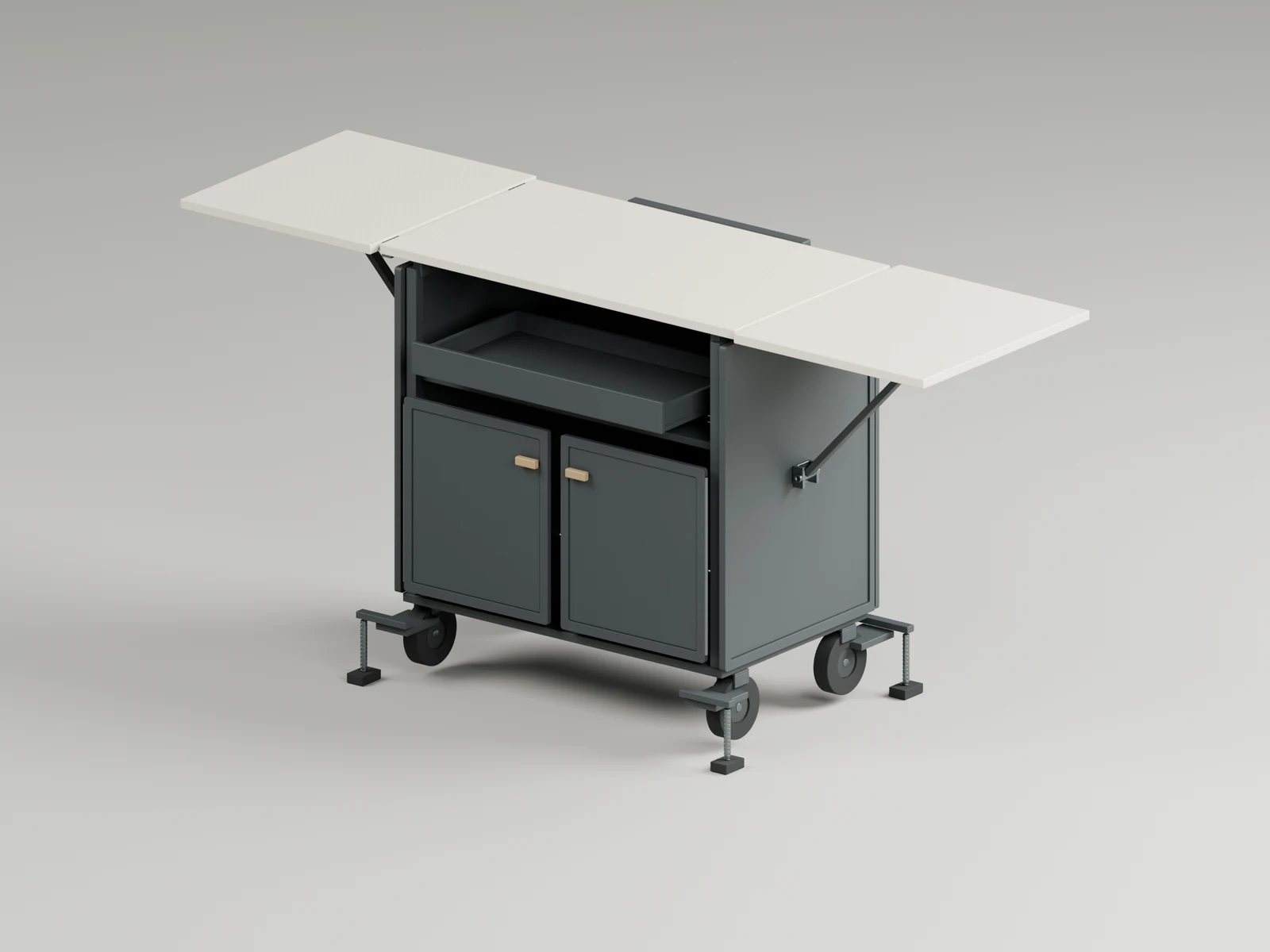
I developed FIELD FOLD as a fictional outdoor kitchen and workstation. Product imagery establishes its material identity; the browser version lets you follow the fold-out sequence and inspect the assembly from your own angle.
Read the study ↓Try it yourself ↓The brief
Make the transformation understandable.
The starting point was a compact cabinet that opens into a wider work surface. I wanted the product to read clearly in a still image, while also explaining what changes between its parked and deployed configurations.
That called for a connected set of outputs: product geometry, consistent surface treatments, a rigid transformation sequence and a browser model with recognizable parts. The live study follows a programmed sequence. It does not calculate forces or prove that the mechanism could be manufactured safely.
What I worked on
- Developed the fictional product and its open and closed forms.
- Created a material atlas for the cabinet, work surfaces and hardware.
- Authored five action clips for deployment, retraction, transport and service access.
- Connected semantic modules, parts and joints to inspection controls.
- Prepared product CGI and a separate static AR study.
The movement
One sequence. Six readable phases.
The main deployment takes eight seconds. A scrubber lets you stop at any point and look closely at the relationship between the leaves, braces, latches and tray.
Park
0–0.75 s
Stow handle
0.75–1.5 s
Unfold leaves
1.5–3.5 s
Position braces
3.5–5.5 s
Engage latches
5.5–6 s
Extend tray
6–8 s
Transport handle and service doors have their own two-second actions. Deployment from transport is a separate eight-second clip. Pause holds the current animated pose.
From product CGI to the browser
A consistent assembly, with room to inspect.
The runtime model contains 15 modules, 137 semantic parts and 19 joints. Its 52,616 asset triangles are arranged into 19 rigid render batches. Three embedded PBR atlases keep the materials with the model instead of requiring a separate texture download.
Part inspection isolates the selected geometry. Joint axes show the animated local axes, while wireframe makes the underlying mesh visible. Hide cabinet removes the cabinet and service-door batches so the inner arrangement can be examined.
The exploded view uses deliberately separated display offsets. It is a non-physical illustration, not another deployment state. Returning to the full view and using Reset all restores the original closed assembly, lighting, camera, selections and inspection toggles.
- Semantic structure
- 15 modules · 137 parts · 19 joints
- Web geometry
- 52,616 asset triangles · 19 batches
- Action clips
- 5 programmed animations
- Material maps
- 3 embedded PBR atlases
The offline CGI and live viewer are separate rendering outputs. Lighting, shadows and materials can look different; no pixel-identical rendering claim is made.
The separate Web AR study
Keep the device evidence in context.
The project also explored separate static OPEN and CLOSED AR configurations. The owner reported entry and approximately twenty seconds of stable ground placement on an iPhone 12 Pro Max in a limited test session. That report is not a new test performed for this website.
The fixed-scale mode could not enter AR. Android and tape-measured real-world dimensions remain untested. Desktop interaction, asset readback and simulated checks do not establish physical-device validation or cross-device compatibility.
The website demonstration below is the desktop browser runtime. It includes no AR launch, USDZ download or additional AR dependency.
Important limits
Independent Product Demonstration · Fictional Product. FIELD FOLD is not a production customer deployment.
The transformation is programmed, not a certified mechanical simulation. No manufacturing, mechanical-load, cooking-safety or production AR certification is claimed.
This study shows how product visuals, semantic structure and an interactive presentation can work together. A similar client project would need its own agreed engineering scope and device validation.
Sources & credits ↗The interactive version
Try it yourself.
Open the workstation, pause its transformation, then inspect a part or compare the non-physical exploded view.
- Open, close and scrub the transformation
- Inspect parts, joint axes and wireframe
- Change camera and lighting, then reset everything
Desktop browser interaction only. The separate, limited owner-reported iPhone AR result does not validate this viewer, fixed-scale AR, Android or real-world dimensions.
This is a working interactive model. A recorded demonstration cannot replace the live controls.
Asset and runtime notices ↗