
Independent Engineering Reconstruction Study
FarmBot universal tool mount
One interface for seeding, watering and soil sensing.
I reconstructed a tool interface from public FarmBot Genesis v1.8 engineering material, then turned it into a guided visual explanation. The study separates documented facts, derived geometry and the details that remain unknown.
Read the study ↓Try it yourself ↓The brief
Reconstruct the interface. Explain its relationships.
The available engineering information was spread across drawings, assembly documents, a bill of materials and functional descriptions. Some manufacturing details remained unknown.
I used that public material to reconstruct an editable interface study, then built an explanation of how one motion system can work with a Seeder, Watering tool and Soil Sensor.
The source is FarmBot Genesis v1.8. This is an independent AptRays study, not a FarmBot customer project or endorsement.
What I worked on
- Organized source evidence and the gaps in that evidence.
- Built and froze a first reconstruction before using held-out reference geometry.
- Compared the reconstruction with that reference and documented corrections.
- Created a guided story, question-based exploration and connection inspection.
The method
Keep the evidence separate from the interpretation.
A reconstruction needs a record of why a shape exists. The first model and the corrected model serve different purposes: one shows what the source documents supported, while the other incorporates documented comparison results.
The final viewer explains the system. It does not turn incomplete source information into certified engineering data.
Recover the source record
Identify drawings, assembly information and functional descriptions, including what is missing.
Freeze the first reconstruction
Build from the available evidence and explicit constraints before opening the held-out reference.
Compare and correct
Document differences and produce a separately corrected engineering master.
Build the explanation
Translate the relationships into a guided sequence and inspection paths, with sources and limits still accessible.
One interface, three roles
Follow what each tool needs from the connection.
The experience connects retention, media and electrical roles with the work of each tool. It also marks where the internal route or engineering condition remains unknown.
Seeder
Pick a seed.
The explanation connects the tool with the interface's vacuum role. The visual sequence describes the function; it does not simulate airflow.
Watering
Deliver water.
Media ports and seals are part of the connection story. Unknown internal routing and sealing details remain limits of the reconstruction.
Soil Sensor
Read a signal.
The study distinguishes tool verification from soil sensing. It does not show a live soil measurement or a calibrated moisture value.
From watching to inspecting
Pause the story and examine the connection.
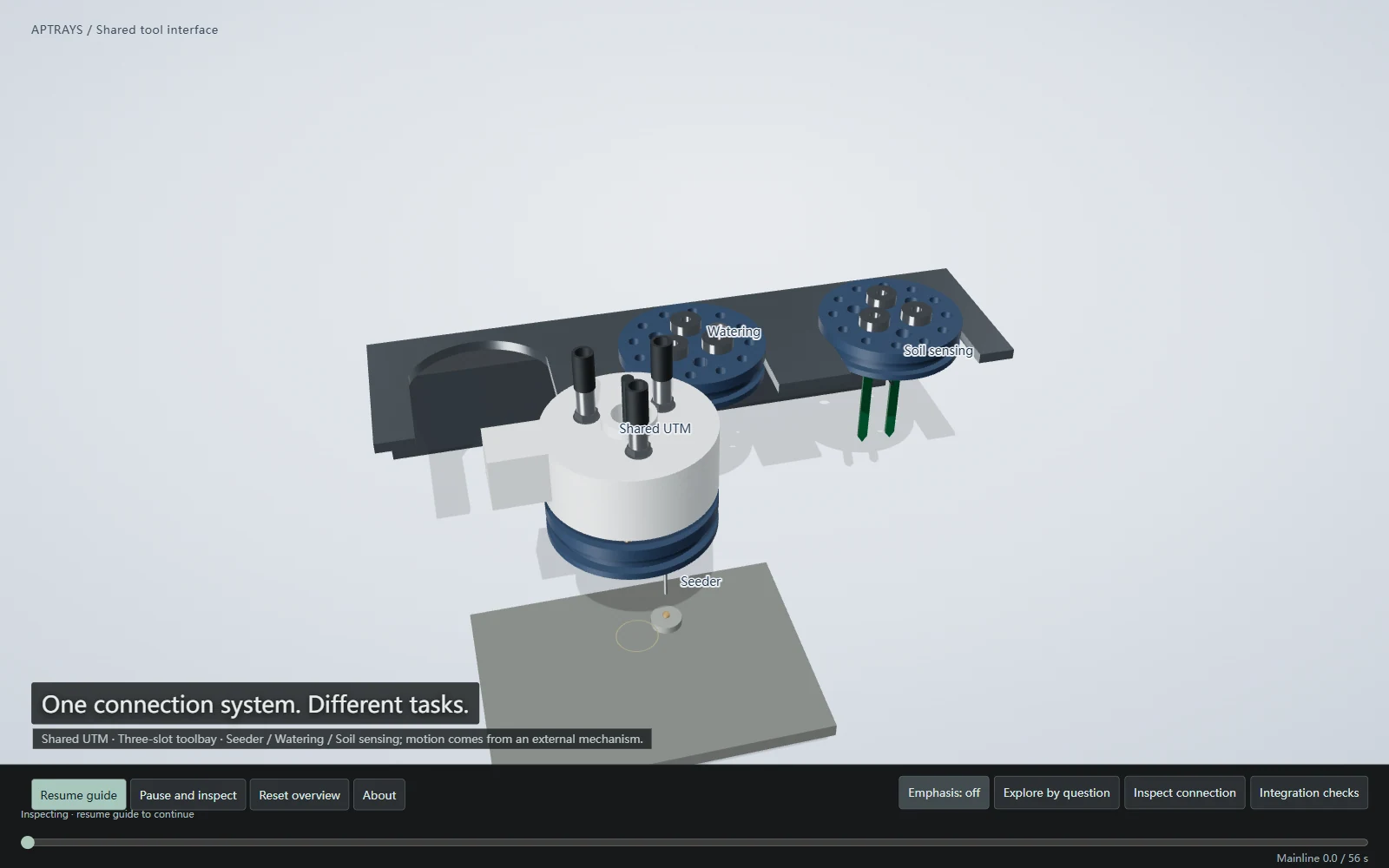
The desktop experience includes a 56-second guided tour, question-based exploration and a connection inspector. A visitor can pause the explanation, compare the three tools and return to the overview.
Compatibility is treated as a question to investigate. Geometry, clearance, wiring, media, seals, load and operating conditions all need review before another tool can be considered compatible.
Desktop interaction. A clear phone fallback.
The approved interactive scope is desktop. At 760 px and below, the experience shows a static cover and sources instead of loading the desktop 3D scene.
The screenshot above is a preview. Open the desktop experience at the end of this page to operate the viewer yourself.
Open the experience ↓For a similar client project
A traceable model and an understandable story.
A similar project could include:
- A source register and an explicit reconstruction scope.
- Editable geometry, reference comparison and documented corrections.
- Explanatory visuals and a guided browser experience.
- Inspection controls with visible evidence and limitations.
Important limits
This is an Independent Engineering Reconstruction Study. It is not OEM manufacturing CAD, a tolerance specification or a new-tool compatibility certification.
No physical product test, real-user study, CFD, circuit simulation, magnetic-force validation, load test or seal certification is claimed.
FarmBot's functional hardware and documentation sources are recorded as CC0. No FarmBot logos or marketing images are reused. The reconstruction implementation, visual expression and interaction are independent AptRays work.
Mobile 3D is not certified. The phone experience intentionally remains a static preview with sources.
Source attribution & credits ↗The interactive version
Try it yourself.
On desktop, start the guided tour, pause to inspect a connection or explore by question. Compare the Seeder, Watering and Soil Sensor tools.
- Guided tour
- Explore by question
- Inspect connection
- Compare tools
Desktop interaction only. At 760 px and below, the experience preserves a static cover and sources fallback; mobile WebGL is not certified.
Sources & credits ↗